
Web Server
Modern.js provides an integrated Web server for applications that can run in any container environment with Node.js. Whether executing the dev command in a local development environment, running the build && serve commands in a production environment, or using the official deployment solution, it all runs through this Web server to host the application.
Underlying Dependencies
Modern.js builds its Web server based on the Hono framework. Hono is a small, simple, and ultra-fast web standard-based framework that can run on any JavaScript runtime.
Development & Production
The Web server flow in both Modern.js development and production environments is entirely isomorphic, so you don't need to worry about differences between them.
As mentioned in the Build Tools section, Modern.js' underlying build capability is provided by Rsbuild, and some server-side capabilities in the development environment are coupled with the build tools, such as HMR. Modern.js needs to reuse these capabilities of the Rsbuild Dev Server.
In the development environment, Modern.js directly uses the middlewares provided by Rsbuild, which includes capabilities needed during the development stage such as HMR and Proxy. Additionally, Modern.js provides capabilities such as Mock, routing, and rendering on top of this:
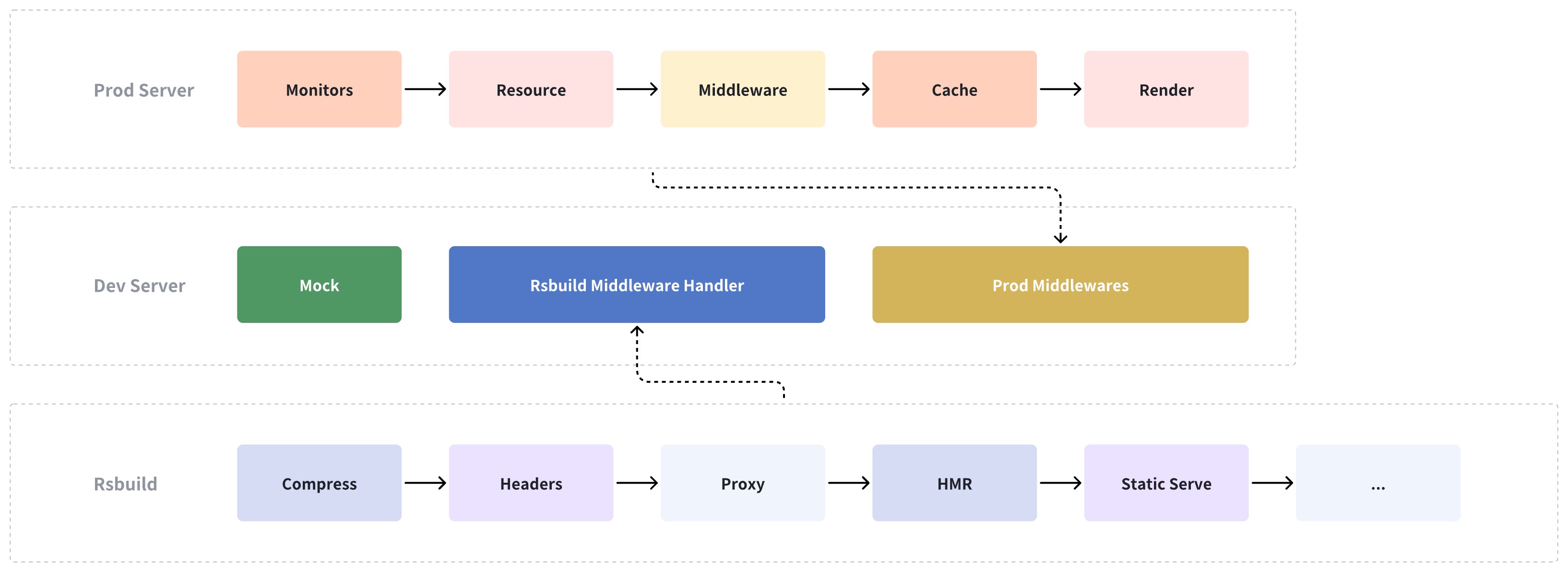
Therefore, in Modern.js, the development environment merely adds middleware to the production environment. All capabilities of the production environment are also applicable in the development environment, ensuring no fragmentation between the two.
Static asset files can be directly hosted by Modern.js' server, but it is highly recommended to upload these files to a CDN in a production environment.
Running in CI Environments
Modern.js supports running built artifacts in any Node.js environment. Typically, the CI environment has already installed all application dependencies.
You can run the modern build command to build the application and the modern serve command to run the Web server, starting the Modern.js application.
Running in Production Environments
When deploying to production, the artifact size should be as small as possible. The aforementioned method for running in CI environments keeps all artifacts from the original project. Therefore, it is not recommended to run the application using the above commands in a production environment.
Modern.js offers a standalone deployment solution. When running the modern deploy command, the artifacts will include an entry file for running the Web server.