
logo
  • Guide
  • Config
  • Plugin
  • API
  • Examples
  • Community
  • Modern.js 2.x Docs
  • English
    • 简体中文
    • English
    • Start
      Introduction
      Quick Start
      Upgrading
      Glossary
      Tech Stack
      Core Concept
      Page Entry
      Build Engine
      Web Server
      Basic Features
      Routes
      Routing
      Config Routes
      Data Solution
      Data Fetching
      Data Writing
      Data Caching
      Rendering
      Server-Side Rendering
      Streaming SSR
      Rendering Cache
      Static Site Generation
      Render Preprocessing
      Styling
      Styling
      Use CSS Modules
      Using CSS-in-JS
      Using Tailwind CSS
      HTML Template
      Import Static Assets
      Import JSON Files
      Import SVG Assets
      Import Wasm Assets
      Debug
      Data Mocking
      Network Proxy
      Using Rsdoctor
      Using Storybook
      Testing
      Playwright
      Vitest
      Jest
      Cypress
      Path Alias
      Environment Variables
      Output Files
      Deploy Application
      Advanced Features
      Using Rspack
      Using BFF
      Basic Usage
      Runtime Framework
      Extend BFF Server
      Extend Request SDK
      File Upload
      Cross-Project Invocation
      Optimize Page Performance
      Code Splitting
      Inline Static Assets
      Bundle Size Optimization
      React Compiler
      Improve Build Performance
      Browser Compatibility
      Low-Level Tools
      Source Code Build Mode
      Server Monitor
      Monitors
      Logs Events
      Metrics Events
      Internationalization
      Basic Concepts
      Quick Start
      Configuration
      Locale Detection
      Resource Loading
      Routing Integration
      API Reference
      Advanced Usage
      Best Practices
      Custom Web Server
      Topic Detail
      Module Federation
      Introduction
      Getting Started
      Application-Level Modules
      Server-Side Rendering
      Deployment
      Integrating Internationalization
      FAQ
      Dependencies FAQ
      CLI FAQ
      Build FAQ
      HMR FAQ
      Deprecated
      📝 Edit this page
      Previous pageRuntime FrameworkNext pageExtend Request SDK

      #Extend BFF Server

      In some applications, developers may want to handle all BFF functions uniformly, such as authentication, logging, data processing, etc.

      Modern.js allows users to freely extend the BFF Server through Middleware method.

      #Using Middleware

      Developers can use middleware by configuring middlewares in server/modern.server.ts. The following describes how to write a BFF middleware manually to add permission verification:

      server/modern.server.ts
      import {
        type MiddlewareHandler,
        defineServerConfig,
        getCookie
      } from '@modern-js/server-runtime';
      
      const requireAuthForApi: MiddlewareHandler = async (c, next) => {
        if (c.req.path.startsWith('/api') && c.req.path !== '/api/login') {
          const sid = getCookie(c, 'sid');
          if (!sid) {
            return c.json({ code: -1, message: 'need login' }, 400);
          }
        }
        await next();
      };
      
      export default defineServerConfig({
        middlewares: [
          {
            name: 'require-auth-for-api',
            handler: requireAuthForApi,
          },
        ]
      });
      

      Then add a regular BFF function api/lambda/hello.ts:

      api/lambda/hello.ts
      export default async () => {
        return 'Hello Modern.js';
      };

      Next, in the frontend src/routes/page.tsx, add the interface access code and directly use the integrated method to call:

      src/routes/page.tsx
      import { useState, useEffect } from 'react';
      import { get as hello } from '@api/hello';
      
      export default () => {
        const [text, setText] = useState('');
      
        useEffect(() => {
          async function fetchMyApi() {
            const { message } = await hello();
            setText(message);
          }
      
          fetchMyApi();
        }, []);
      
        return <p>{text}</p>;
      };

      Now run the dev command to start the project, and access http://localhost:8080/ to find that the request for /api/hello has been intercepted:
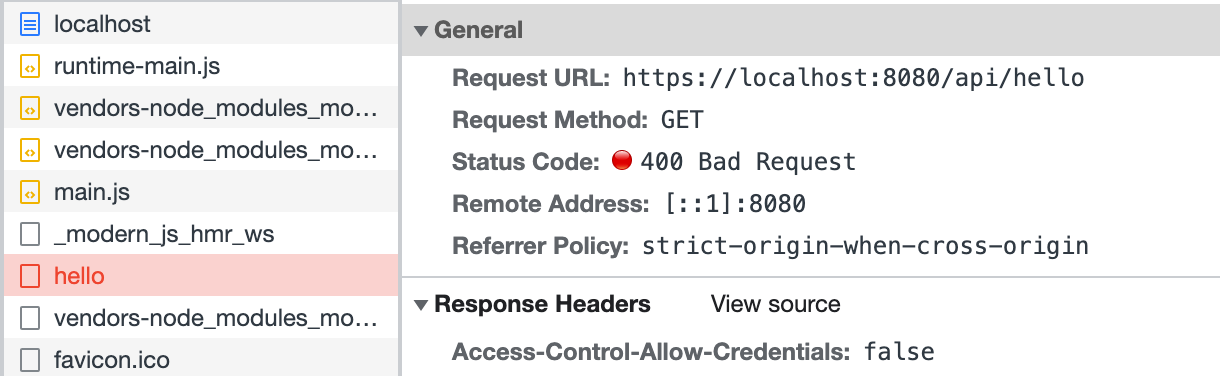
      Network

      Finally, modify the frontend code src/routes/page.tsx, and call the login interface before accessing /api/hello:

      Note

      This part does not implement a real login interface; the code is just for demonstration.

      import { useState, useEffect } from 'react';
      import { get as hello } from '@api/hello';
      import { post as login } from '@api/login';
      
      export default () => {
        const [text, setText] = useState('');
      
        useEffect(() => {
          async function fetchAfterLogin() {
            const { code } = await login();
            if (code === 0) {
              const { message } = await hello();
              setText(message);
            }
          }
          fetchAfterLogin();
        }, []);
      
        return <p>{text}</p>;
      };

      Refresh the page, and you can see that the access to /api/hello is successful:
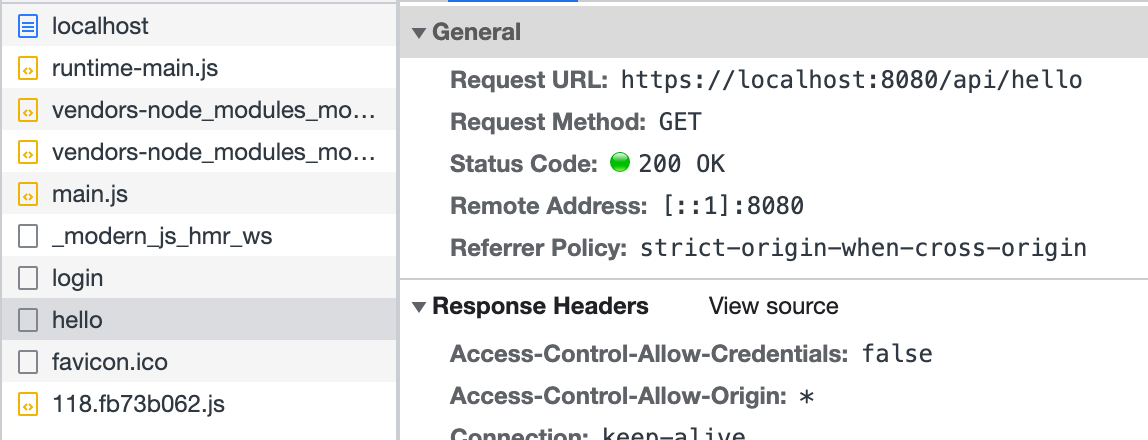
      Network

      The above code simulates defining middleware in server/Modern.server.ts and implements a simple login function. Similarly, other functionalities can be implemented in this configuration file to extend the BFF Server.