
Metrics Events
Metric events are distributed by Monitors as events of type timing or counter.
Built-in Events
When SSR is enabled, we need to monitor server-side phase durations and have the capability to diagnose server-side issues.
Based on server-side runtime logic, Modern.js provides the following metric events:
| Key | Description |
|---|---|
| server-handle-request | EdenX Server request handling duration |
| ssr-render-shell | [SSR] When using Streaming SSR, React renders a shell for early streaming. This marks shell rendering completion time |
| ssr-render-html | [SSR] Time taken by React to render component tree to HTML (typically under 50ms) |
| server-middleware | Total execution time of EdenX custom server middlewares |
| server-loader | Server-side Data Loader total duration |
| server-loader-#id | Individual Data Loader durations on server-side |
| server-loader-navigation | Server-side Data Loader duration during client navigation |
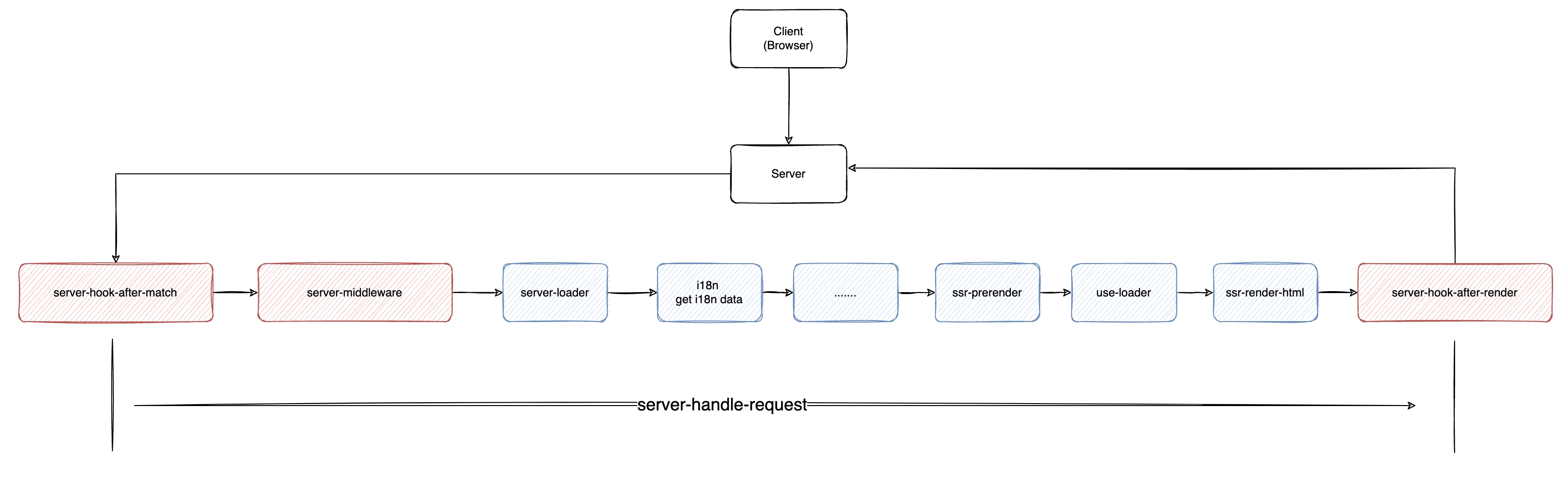
Modern.js server workflow diagram:
Built-in Monitor
In Modern.js, metric events are also handled by LoggerMonitor, which outputs metrics to the console in a specific format.
The built-in LoggerMonitor depends on the rslog library.
The rslog instance initialized in Modern.js outputs logs at debug level and above in development environment by default, and outputs all logs in production environment. In the built-in LoggerMonitor, all metric events are output as Debug logs. Therefore, if you want to view metric event information in the development environment, you need to add additional environment variables.
Developers can add the environment variable DEBUG=true when running the dev command. If running normally, after accessing, you can see the following output in the console:
> Local:    http://localhost:8080/
> press h + enter to show shortcuts

debug   SSR Debug - server-loader, cost: 2.000094, req.url = /
debug   SSR Debug - ssr-prerender, cost: 6.99997, req.url = /
debug   SSR Debug - ssr-render-html, cost: 0.999927, req.url = /
debug   Debug - server-handle-request, cost: 19.999981, req.url = /
debug --> GET / 200 90msServer-Timing
Modern.js injects phase metrics as Server-Timing headers into HTML responses.
Developers can retrieve these metrics using the Performance API in browsers:
const navigation = performance.getEntriesByType('navigation')[0];
const serverTiming = navigation.serverTiming;
console.log(serverTiming);