
Commands
Modern.js has some built-in commands that can help you quickly start a development server, build production environment code, and more.
Through this chapter, you can learn about the built-in commands of Modern.js and how to use them.
modern dev
The modern dev command is used to start a local development server and compile the source code in the development environment.
Usage: modern dev [options]

Options:
  -e --entry <entry>    compiler by entry
  -c --config <config>  specify the configuration file, which can be a relative or absolute path
  -h, --help            show command help
  --analyze             analyze the bundle and view size of each module
  --web-only            only start web service
  --api-only            only start API service
After running modern dev, Modern.js will watch source file changes and apply hot module replacement.
$ modern dev

info    Starting dev server...

  > Local:    http://localhost:8080/
> Network: http://192.168.0.1:8080/Compile Partial Pages
In multi-page (MPA) projects, the --entry option can be added to specify one or more pages to compile. In this way, only part of the code in the project will be compiled, and the dev startup speed will be faster.
For example, execute modern dev --entry, the entry selector will be displayed in the command line interface:
$ modern dev --entry

? Please select the entry that needs to be built
❯ ◯ foo
  ◯ bar
  ◯ baz
For example, if you select the foo entry, only the code related to the foo entry will be compiled, and the code of other pages will not be compiled.
Specify the page by parameter
You can also specify the page name through parameters after --entry, and the names of multiple pages can be separated by commas.
# Compile foo page
modern dev --entry foo

# Compile foo and bar pages
modern dev --entry foo,barmodern start
modern start is an alias of modern dev command, the usage of the two are exactly the same.
modern build
The modern build command will build production-ready artifacts in the dist/ directory by default. You can specify the output directory by modifying the configuration output.distPath.
Usage: modern build [options]

Options:
  -c --config <config>  specify the configuration file, which can be a relative or absolute path
  -h, --help            show command help
  -w --watch            turn on watch mode, watch for changes and rebuild
--analyze analyze the bundle and view size of each moduleAnalyze Bundle
execute npx modern build --analyze command, can produce an HTML file that analyzes the volume of the bundle while packaging the production code:
Bundle Analyzer saved report to /example/dist/report.html

info    Production file sizes:

  File                                      Size         Gzipped
  dist/static/js/lib-react.09721b5c.js      152.6 kB     49.0 kB
  dist/html/main/index.html                 5.8 kB       2.5 kB
  dist/static/js/main.3568a38e.js           3.5 kB       1.4 kB
  dist/static/css/main.03221f72.css         1.4 kB       741 B
Open the above HTML file in the browser, you can see the tile diagram of the bundled files, and perform package volume analysis and optimization:
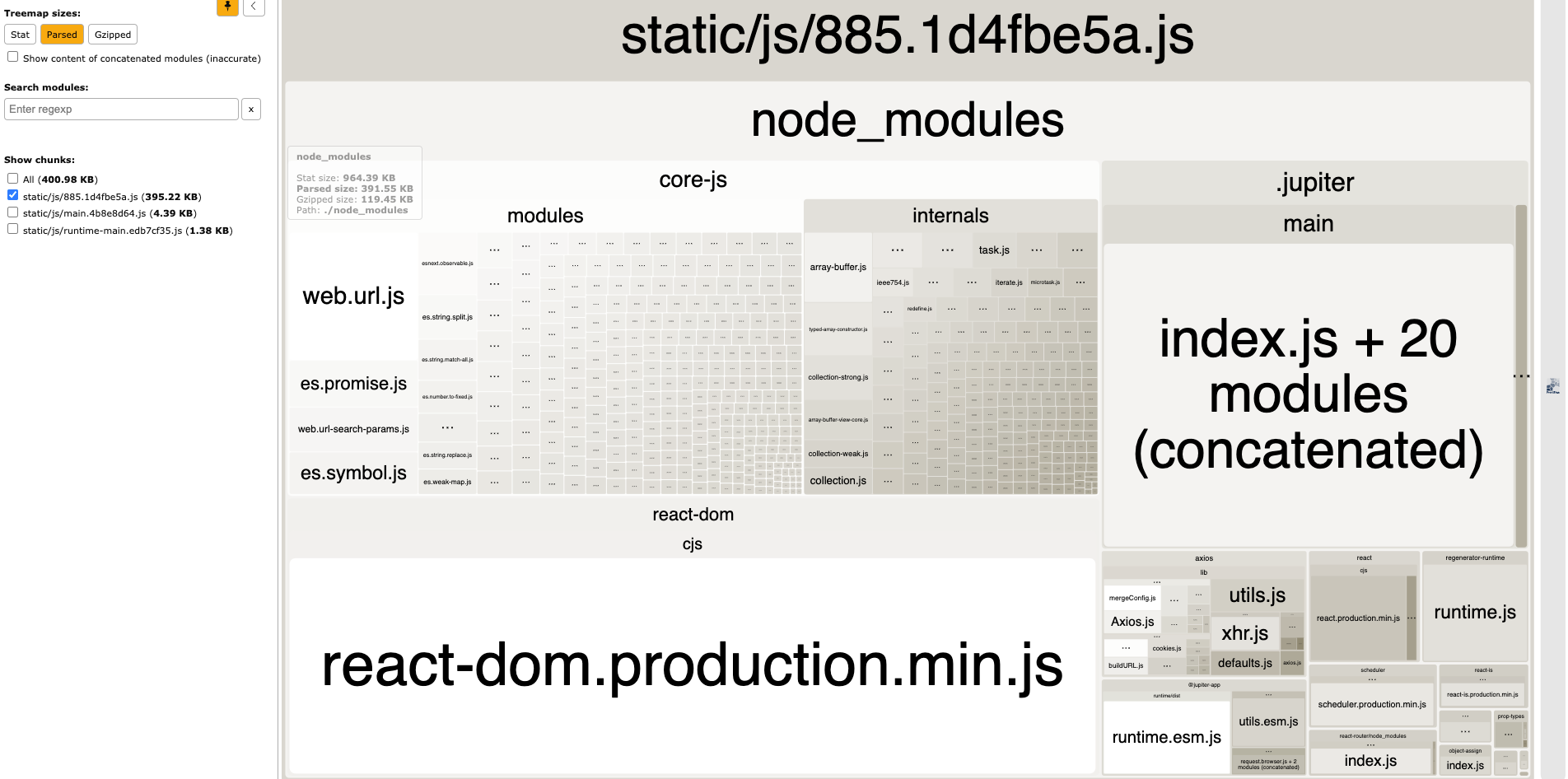
this features based on webpack-bundle-analyzer.
modern new
The modern new command is used to enable features in an existing project.
For example, add application entry, enable some optional features such as BFF, micro frontend, etc.
Usage: modern new [options]

Options:
  --config-file <configFile>  specify the configuration file, which can be a relative or absolute path
  --lang <lang>          set the language (zh or en) for the new command.
  -d, --debug            using debug mode to log something (default: false)
  -c, --config <config>  set default generator config(json string)
  --dist-tag <tag>       use specified tag version for its generator
  --registry             set npm registry url to run npm command
-h, --help show command helpAdd Entry
In the project, execute the new command to add entries as follows:
$ npx modern new
? Please select the operation you want: Create Element
? Please select the type of element to create: New "entry"
? Please fill in the entry name: entryEnable Features
In the project, execute the new command to enable features as follows:
$ npx modern new
? Please select the operation you want: Enable Features
? Please select the feature name: (Use arrow keys)
❯ Enable BFF
  Enable SSG
  Enable Micro Frontend
The --config parameter needs to use a JSON string.
pnpm does not support the use of JSON strings as parameter values currently. Use npm new to turn on.【Relate Issue】
modern serve
The modern serve command is used to start a Modern.js project in the production environment. It can also be used to preview the artifacts built for the production environment locally. Please note that you need to execute the build command beforehand to generate the corresponding artifacts.
Usage: modern serve [options]

Options:
  -c --config <config>  specify the configuration file, which can be a relative or absolute path
  -h, --help            show command help
  --api-only            only run API service
By default, the project will run in localhost:8080, you can modify the server port number with server.port:
export default defineConfig({
  server: {
    port: 8081,
  },
});modern upgrade
Execute the command npx modern upgrade in the project, by default, dependencies in the package.json are updated to the latest version.
Usage: modern upgrade [options]

Options:
  --config <config> specify the configuration file, which can be a relative or absolute path
  --registry <registry>  specify npm registry (default: "")
  -d,--debug             using debug mode to log something (default: false)
  --cwd <cwd>            app directory (default: "")
-h, --help show command helpmodern inspect
The modern inspect command is used to view the Modern.js config, Rsbuild config and webpack or Rspack config of the project.
Usage: modern inspect [options]

Options:
  --env <env>           view the configuration in the target environment (default: "development")
  --output <output>     Specify the path to output in the dist (default: "./")
  --verbose             Show the full function in the result
  -c --config <config>  specify the configuration file, which can be a relative or absolute path
  -h, --help            show command help
After executing the command npx modern inspect in the project root directory, the following files will be generated in the dist directory of the project:
modern.js.config.mjs:The Modern.js configuration currently used.rsbuild.config.mjs: The Rsbuild config to use at build time.webpack.config.web.mjs: The webpack config used by to use at build time.
➜ npx modern inspect

Inspect config succeed, open following files to view the content:

  - Rsbuild Config: /root/my-project/dist/rsbuild.config.mjs
  - Webpack Config (web): /root/my-project/dist/webpack.config.web.mjs
- Modern.js Config: /root/my-project/dist/modern.js.config.mjsConfiguration Env
By default, the inspect command will output the development configs, you can use the --env production option to output the production configs:
modern inspect --env productionVerbose content
By default, the inspect command will omit the function content in the config object, you can use the --verbose option to output the full content of the function:
modern inspect --verboseSSR Configuration
If the project has enabled SSR, an additional webpack.config.node.mjs file will be generated in the dist/, corresponding to the webpack configuration at SSR build time.
➜ npx modern inspect

Inspect config succeed, open following files to view the content:

  - Rsbuild Config: /root/my-project/dist/rsbuild.config.mjs
  - Webpack Config (web): /root/my-project/dist/webpack.config.web.mjs
  - Webpack Config (node): /root/my-project/dist/webpack.config.node.mjs
- Modern.js Config: /root/my-project/dist/modern.js.config.mjsmodern deploy
The modern deploy command is used to generate artifacts required for the deployment platform.
Usage: modern deploy [options]

Options:
  -c --config <config>  Specify configuration file path, either relative or absolute
  -s --skip-build       Skip the build stage
  -h, --help            Display command help
For more details, refer to Deploy Application.